
Calculate
Calculate 2.0 alpha 3 -
a new native macOS version - is now available. Download now
(Requires macOS 10.14.4 or newer)
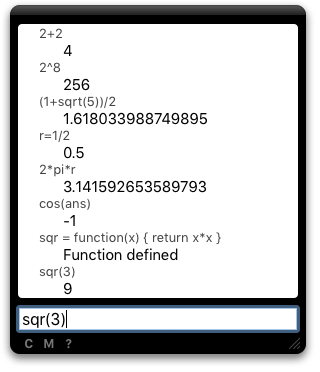
Calculate is a Mac OS X widget for evaluating math expressions. Any JavaScript expression can be evaluated, and variables and functions are persistently stored.
Comments from Calculate users
“I’ve tried a bunch of other calculator widgets but yours blows me away. Clean, simple, very ‘macintosh-esque’. I love it!” — Jay M
“I love the calculate widget! ... I am a math teacher and I have just started using your widget! It is great!” — Ebbe V
“It’s the formula calc widget with the richest functionality I have found.” — Magnus C
“Defintely the nicest widget calculator I’ve used.” — Gabe G
Arithmetic Operations
Basic Arithmetic
| Operator | Description | Example |
|---|---|---|
| + | Addition | 2+2 |
| - | Subtraction | 5-3 |
| * | Multiplication | 9*6 |
| / | Division | 48/6 |
| ^ | Exponentiation (power of) | 10^2 |
| % | Remainder after division | 7%3 |
| ! | Factorial | 5! |
| = | Assignment | a=2 |
Bitwise operations
| Operator | Description | Example |
|---|---|---|
| ~ | Bitwise NOT | ~0 |
| & | Bitwise AND | 2&6 |
| | | Bitwise OR | 2|4 |
| >< | Bitwise XOR | 2><6 |
| << | Left Shift (padding with zeros) | 20<<1 |
| >> | Right shift (copying the sign bit) | -4>>1 |
| >>> | Right shift (padding with zeros) | -4>>>1 |
You can enter numbers as hexadecimal, octal or binary. Hexadecimal numbers start with 0x, octal numbers with 0o and binary numbers with 0b. For example: 0b110100 - 0xA.
Functions
Basic functions
| abs(a) | The absolute value of a |
| ceil(a) | Integer closest to a and not less than a |
| floor(a) | Integer closest to and not greater than a |
| max(a,b) | The maximum of a and b |
| min(a,b) | The minimum of a and b |
| pow(a,b) | a to the power b |
| random() | Pseudorandom number in the range 0 to 1 |
| round(a) | Integer closest to a |
| sqrt(a) | Square root of a |
Log functions
| exp(a) | Exponent of a |
| ln(a) | Log of a base e |
| log2(a) | Log of a base 2 |
| log10(a) | Log of a base 10 |
Trig functions
| sin(a) | Sine of a |
| cos(a) | Cosine of a |
| tan(a) | Tangent of a |
| csc(a) | Cosecant of a |
| sec(a) | Secant of a |
| cot(a) | Cotangent of a |
| asin(a) | Arc sine of a |
| acos(a) | Arc cosine of a |
| atan(a) | Arc tangent of a |
| atan2(a,b) | Arc tangent of a/b |
| acsc(a) | Arc cosecant of a |
| asec(a) | Arc secant of a |
| acot(a) | Arc cotangent of a |
Hyperbolic functions
| sinh(a) | Hyperbolic sine of a |
| cosh(a) | Hyperbolic cosine of a |
| tanh(a) | Hyperbolic tangent of a |
| csch(a) | Hyperbolic cosecant of a |
| sech(a) | Hyperbolic secant of a |
| coth(a) | Hyperbolic cotangent of a |
| asinh(a) | Hyperbolic arc sine of a |
| acosh(a) | Hyperbolic arc cosine of a |
| atanh(a) | Hyperbolic arc tangent of a |
| acsch(a) | Hyperbolic arc cosecant of a |
| asech(a) | Hyperbolic arc secant of a |
| acoth(a) | Hyperbolic arc cotangent of a |
More functions
Copy and paste these functions into Calculate, or write your own custom functions in JavaScript. Custom functions are automatically saved.
avg = function () { var sum = 0; for (var i = 0; i < avg.arguments.length; i++) { sum += arguments[i]; } return sum / arguments.length; }
median = function () { var list = Array.prototype.slice.call(arguments); list.sort(function(a, b) { return a - b; } ); var i = Math.floor(list.length / 2); if (list.length % 2) { return list[i]; } else { return (list[i] + list[i - 1]) / 2; } }
sign = function (x) { return x < 0 ? -1 : x > 0 ? 1 : 0; }
toDegrees = function (r) { return r * 180 / pi; }
toRadians = function (d) { return d * pi / 180; }
fibonacci = function (n) { var a = 0; var b = 1; for (var i = 1; i <= n; i++) { var c = a + b; a = b; b = c; } return a; }
nextPOT = function (n) { var x = 1; while (x < n) { x <<= 1; } return x; }
toHex = function (x) { return x.toString(16); }
toBin = function (x) { return x.toString(2); }
toChar = function (i) { return String.fromCharCode(i); }
toUnicode = function (ch) { return ch.charCodeAt(0); }
More info
You can use hexadecimal, octal and binary numbers. Prefix hexadecimal numbers with 0x, octal numbers with 0o and binary numbers with 0b. For example: 0x7f + 0b10010101.Get the source
Want to tweak the source code? Visit the project page at GitHub.
Questions
- Q: Can Calculate automatically convert commas to periods for people using
international keyboards?
A: Calculate needs to work seamlessly with JavaScript to provide functions, and converting commas would cause problems. For example, converting "pow(2,5)" to "pow(2.5)" would break. As a workaround, using the comma on the numeric keypad will insert a period.
Changes
Version 1.2.2 (December 17, 2015)
- Use system font on Mac OS X 10.11 El Capitan.
Version 1.2.1 (October 18, 2014)
- Improvements to display of floating-point precision.
- Updates for Mac OS X 10.10 Yosemite.
Version 1.2.0 (June 24, 2014)
- Fixed display of floating-point precision. For example, "0.1+0.2" is now displayed as "0.3" instead of "0.30000000000000004".
- The previous answer is now "ans" (instead of "answer").
- Retina support.
- Modern scroll indicator.
- Minor bug fixes.
- Requires Safari 5 or newer and Mac OS X Lion or newer.
Version 1.1.5 (April 15, 2010)
- Added power operator ^. Example: 2^8. If you're a programmer, for xor use >< instead of ^.
- Added factorial operator !. Example: 5! == 120
- Added binary and octal input. Example: 0b11011 == 0o2840
- Command-C copies the last answer. Make sure nothing is currently selected, and press Command-C to copy last numeric answer to the clipboard.
- Other bug fixes and enhancements.
Version 1.1.4 (November 25, 2008)
- Widget dimensions now persistent between sessions.
- Object literals can now be used. For example:
point = { x:0, y:6 }
Version 1.1.3 (May 3, 2008)
- Fixed focus bug introduced in version 1.1.2
Version 1.1.2 (May 1, 2008)
- Numpad: The clear key clears the input area.
- Numpad (International keyboards): the comma on the numpad is inserted as a period.
Version 1.1.1 (April 2, 2008)
- (Leopard only) Fix for autocompletion when Safari 3.1 is installed.
Version 1.1.0 (February 22, 2008)
- (Leopard only) Added autocompletion of variables and functions names using the Tab key.
Type the first few letters of a variable name or function name, then press Tab.
For example,
1/an<TAB>autocompletes to1/answer. - Added degree mode.
- Added several new functions (log2, log10, and many trig & hyperbolic functions).
- Added several shortcut keys.
Version 1.0.1 (October 31, 2007)
- Fixed minor layout issues in Leopard.
- Widget now has a “back” with a “check for new version” link.
- (Leopard only) Support for some Unicode variable names, like π (option-p).
Version 1.0.0 (April 27, 2007)
- Initial release.